What Is Compute?
Compute is the active engine of the digital universe — the transformation layer, sitting apart from storage (keeping data still) and networking (moving data around). Here's what it actually is, how it works, and where it hits hard physical limits.

Compute is the part of computing that actually does the work: the execution of instructions that turns data into something useful. The word shows up everywhere — "AI needs more compute," "compute costs," "compute shortage" — yet it's rarely defined, and it's routinely blurred together with storage, memory, and the cloud.
Understanding compute matters because it has become one of the scarcest and most strategic resources in the economy: it determines what AI models can be trained, how fast software runs, how much data centers cost, and how much energy the digital world consumes. Misunderstanding it produces two errors: treating it as an abstract, infinite utility, or treating it as just "the computer" as a whole. This explainer builds a precise mental model — what compute is, how it physically works, and where it hits hard limits.
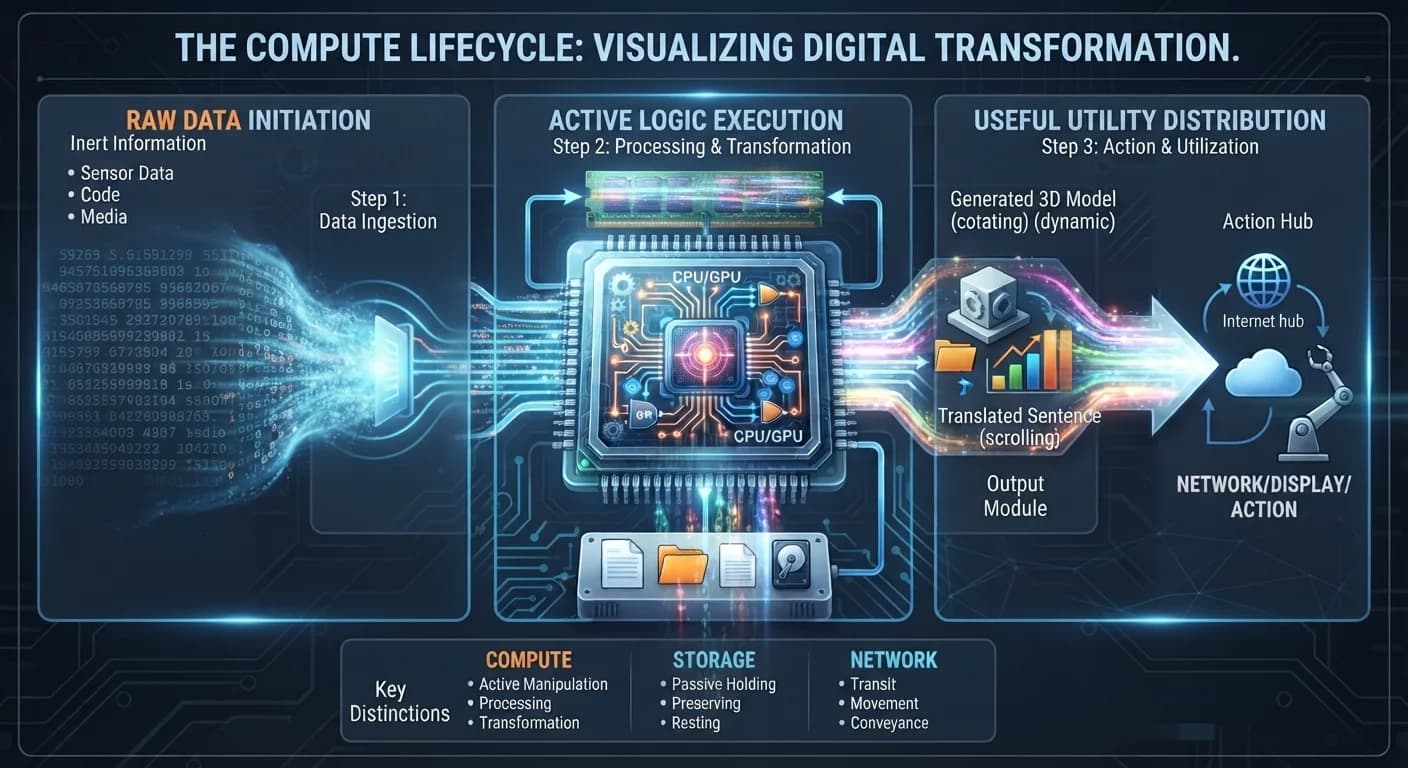
What Is Compute, Exactly?
Compute is one of three functional layers of any computing system — alongside storage (keeping data still) and networking (moving data around). Compute is the layer that transforms.
The hierarchy: Information Technology → Computing Systems (machines that process information) → Functional layers: Storage (preserve) / Networking (transmit) / Compute (transform) → Compute hardware (CPUs, GPUs, specialized accelerators) → Compute as a resource (measured in operations per second, sold by the hour in the cloud).
Plain-English definition: Compute is the processing power a machine uses to carry out instructions — the "doing" part of a computer.
More technical definition: Compute is the execution of instructions by a processor that systematically transforms input data into new output through logical and arithmetic operations, physically implemented as the switching of transistors between states, and measured by the rate at which such operations can be performed.
Beginner version: If data is the ingredients, compute is the cooking.
What this definition does NOT imply: Compute is not the same as storage (a hard drive holds data but computes nothing), not the same as memory (RAM holds data for the processor), and not the same as networking (cables move data without changing it). It also isn't abstract or free — every operation is a physical event that consumes energy and produces heat.
Compute vs. Storage vs. Memory vs. Networking
These are the most commonly confused terms in computing infrastructure.
| Term | What it actually refers to | What it does to data |
|---|---|---|
| Compute | Processors executing instructions (CPU, GPU, accelerators) | Transforms it |
| Memory (RAM) | Fast, temporary workspace next to the processor | Holds it briefly for active use |
| Storage | Persistent drives (SSD, HDD) | Preserves it long-term |
| Networking | Cables, routers, and protocols between machines | Moves it |
| The Cloud | Rented access to all of the above in someone else's data center | Packages it as a service |
The practical consequence: a "slow computer" can be a compute bottleneck (processor maxed out), a memory bottleneck (not enough RAM), a storage bottleneck (slow drive), or a network bottleneck (slow connection). Only one of those is solved by "more compute."
Why Does Compute Exist?
Raw data — billions of sensor readings, uncompressed pixels, unorganized text — has no utility on its own. Compute exists to bridge the gap between inert information and useful results: automating tasks, simulating physical systems, recognizing patterns, and supporting decisions at speeds and scales impossible for human cognition.
Historically, "computers" were people doing calculations by hand. Mechanical and then electronic machines were built because the demand for calculation — for navigation tables, ballistics, census data, and codebreaking — outgrew what people could produce. The function hasn't changed; only the speed and scale have.
How Does Compute Actually Work?
The core principle is the mapping of abstract logic onto physical states. By representing true/false (1/0) with controllable physical phenomena — traditionally high and low voltages in microscopic transistors — physical matter can be arranged to perform arithmetic, comparison, and decision-making.
The pipeline: Input (data and instructions arrive from storage, a network, or a sensor) → Fetch (the processor pulls the next instruction from memory) → Decode (it works out what operation is required) → Execute (logic gates perform the arithmetic or comparison) → Write back (the result is stored in memory or sent onward) → Output (a display, a file, a network message, a physical action).
Simple level: a processor reads an instruction, does what it says to some data, and saves the result — then repeats.
Intermediate level: instructions and data are loaded from storage into RAM, where the processor can reach them quickly. The processor runs a continuous fetch–decode–execute cycle, billions of times per second, timed by a clock. Each cycle performs a tiny step — add two numbers, compare two values, jump to a different instruction — and complex behavior emerges from enormous numbers of these simple steps.
Advanced level: inside the processor, billions of transistors form logic gates (AND, OR, NOT), which combine into arithmetic logic units, registers, and control circuitry. Performance depends on clock speed, how many instructions can run in parallel, and how fast data can be fed in from memory — which is why processors use layers of small, fast caches. CPUs are optimized for fast, flexible, sequential work; GPUs contain thousands of simpler cores optimized for doing the same operation on huge amounts of data in parallel, which is exactly the math that graphics and neural networks require.
The building blocks, one level deeper:
- Processor (CPU / GPU / accelerator): Executes instructions. The CPU is the generalist; the GPU is the parallel specialist; accelerators (like TPUs) are built for narrow workloads such as AI.
- Memory (RAM): High-speed, volatile workspace holding the data and instructions in active use, so the processor doesn't wait on slower storage.
- Storage (SSD / HDD): Non-volatile repository holding data when power is off; feeds memory.
- Buses and interconnects: The pathways that carry data between processor, memory, and peripherals — often the real bottleneck.
- Software: The instructions themselves. Hardware provides capability; software determines what it's used for.
How the parts connect: Storage feeds memory; memory feeds the processor; the processor writes results back to memory; buses carry everything between them. A fast processor starved of data by slow memory or a narrow bus sits idle — which is why system performance depends on balance, not just raw processor speed.
Compute in Action, Step by Step
What happens when you apply a filter to a photo on your phone:
- Load: The image file is read from storage into RAM.
- Instruct: The app issues instructions for the filter — for each pixel, adjust its color values by a formula.
- Parallelize: Because millions of pixels need the same operation, the work is sent to the GPU, which processes many pixels simultaneously.
- Execute: Transistors switch billions of times, performing the arithmetic.
- Write back: The transformed pixels are written to memory and sent to the display.
The lesson: the same principle — input, transformation, output — scales from a single photo to training an AI model on a warehouse of GPUs. What changes is the amount of data and the number of processors working in parallel.
What Can Compute Do?
| Capability | Example | Limitation |
|---|---|---|
| Arithmetic at scale | Financial modeling, scientific simulation | Bound by power and heat |
| Parallel processing | Graphics, AI training | Only helps when the work can be split up |
| Pattern recognition (via AI) | Image recognition, language models | Requires massive compute and data |
| Real-time control | Autonomous vehicles, industrial robots | Errors have physical consequences |
| Simulation | Climate models, protein folding, crash tests | Only as good as the model's assumptions |
Modern compute spans from milliwatt microcontrollers in wristwatches to data centers performing quintillions of operations per second.
A Brief History of Compute
- Human computers (pre-1940s): People performed calculations by hand for tables and science.
- Electromechanical and vacuum-tube machines (1940s): Machines like ENIAC automated calculation, filling entire rooms.
- The transistor (1947) and integrated circuit (1958–59): Replaced fragile tubes with tiny, reliable switches, then put many on a single chip.
- The microprocessor (1971): An entire processor on one chip made personal computing possible.
- Moore's Law era (1970s–2000s): Transistor counts doubled roughly every two years, making compute exponentially cheaper.
- Multicore and GPUs (2000s): When single-core speeds hit heat limits, performance growth shifted to parallelism.
- Accelerators and AI-scale data centers (2010s–today): Specialized chips and massive clusters power AI, turning compute into a strategic resource — see AI compute.
Each transition solved a bottleneck: tubes were unreliable, discrete transistors were bulky, single cores hit a thermal wall, and general-purpose chips were inefficient for AI's parallel math.
What Compute Cannot Reliably Do
Separate fundamental limits from current, practical ones:
- Fundamental — heat and power: Every operation dissipates energy as heat. A chip can only run as fast as it can be cooled (its thermal design power limit).
- Fundamental — physics of miniaturization: As transistors approach atomic scales, quantum tunneling lets electrons leak through barriers, making further shrinking harder and less beneficial.
- Fundamental — some problems don't parallelize: Adding processors doesn't speed up work where each step depends on the previous one.
- Practical — memory bottleneck: Processors are often faster than memory can feed them, leaving compute idle.
- Practical — supply chains: Advanced chips depend on a small number of fabrication plants and geopolitically sensitive materials.
- Logical — garbage in, garbage out: Compute executes instructions faithfully, including buggy, biased, or insecure ones.
Failure modes and edge cases: Normally, more compute means faster results. But when a workload is memory-bound, adding processors does nothing; when chips overheat, they throttle and slow down; when hardware flaws exist (such as speculative-execution vulnerabilities), the very optimizations that make processors fast become security risks.
Benefits, Risks, and Trade-Offs
Compute enables real-time translation, medical imaging, drug discovery simulations, weather forecasting, and the AI systems now spreading through every industry — much of it delivered through cloud infrastructure. Its costs are equally real: large compute clusters consume vast amounts of electricity and water for cooling, strain power grids, and concentrate capability among the few organizations that can afford it.
| Trade-off | Why the tension exists |
|---|---|
| Performance vs. power | Faster chips consume more energy and produce more heat |
| General-purpose vs. specialized | CPUs are flexible; accelerators are far faster but only for specific work |
| Owning vs. renting | On-premise hardware is cheaper at steady scale; the cloud is flexible but costlier over time |
| Speed vs. cost | More compute shortens time-to-result but raises the bill |
| Scale vs. access | Frontier-scale compute concentrates power among a few players |
When Is More Compute the Answer — and What Are the Alternatives?
More compute helps when the bottleneck is genuinely processing: large simulations, AI training, rendering, and heavy data analysis. It doesn't help when the real constraint is memory, storage speed, network latency, or a poorly designed algorithm — often a better algorithm beats more hardware.
Alternative paradigms exist for problems traditional processors handle poorly:
- Analog computing: Uses continuous physical quantities (voltages, currents) instead of discrete bits — potentially very fast and efficient for specific math, but less precise.
- Quantum computing: Uses superposition and entanglement to tackle certain problems (such as simulating molecules or specific optimization tasks) that are intractable for classical machines — still early and error-prone.
- Neuromorphic computing: Chips modeled on the brain's spiking neurons, aiming for extreme energy efficiency.
- Algorithmic efficiency: Doing the same job with fewer operations — often the cheapest "extra compute" available.
The Complete Mental Model
The full loop: Data (in storage or arriving over a network) → Memory (loaded into fast RAM) → Processor (fetch, decode, execute on transistor logic) → Result (written back to memory) → Output (display, file, network, action) → Energy and heat (the physical cost of every operation) → Constraints (power, cooling, supply chains, and algorithm quality set the ceiling).
In plain English: compute is what happens when a processor takes data and instructions and physically flips billions of microscopic switches to produce a new result. It depends on memory to feed it, storage to supply it, and networks to connect it, and it's bounded by physics — every operation costs energy and makes heat. That's why compute has become both the engine of modern technology and one of its most contested resources.
Compute is the physical execution of instructions that transforms data into useful output — implemented as transistor logic in processors like CPUs and GPUs, fed by memory and storage, and scaled from wristwatch chips to AI data centers — distinct from storage (which preserves data) and networking (which moves it), and fundamentally bounded by energy, heat, and the limits of miniaturization.
What is compute in the simplest terms?
Compute is the execution of instructions that transform input data into useful output through logical and mathematical operations. It's the active, transformative layer of a computing system — distinct from storage, which just holds data, and networking, which just moves it.
What's the difference between compute and storage?
Storage (a hard drive or SSD) passively preserves data's static physical arrangement — it doesn't compute anything. Compute is strictly about change and calculation: taking input, processing it through logic, and producing a new output.
What's the difference between compute and networking?
Networking moves bits from one place to another — cables and routers transmit data without altering its meaning. Compute is what changes the data itself. Storage keeps data still, networking moves it around, and compute transforms it.
What are the main components of a compute system?
The processor (CPU/GPU) executes logic; memory (RAM) holds data and instructions currently in use for fast access; storage (SSDs/HDDs) retains data permanently; and buses are the high-speed pathways connecting all of them.
What limits how much compute can scale?
Hard physical constraints: the thermal design power limit (how much heat a chip can safely dissipate), and the fading returns of transistor miniaturization as quantum tunneling effects disrupt sub-nanometer circuits. Logically, compute is also bound by the quality of its software and the biases inherited from its design.
Part of the What Is? explainer series at The Best Blog Ever.