What Is the Internet?
Not a cloud floating in space — a physical network of cables, satellites, and routers moving data in packets across the globe. Here's what the internet actually is, underneath the everyday habit of using it.
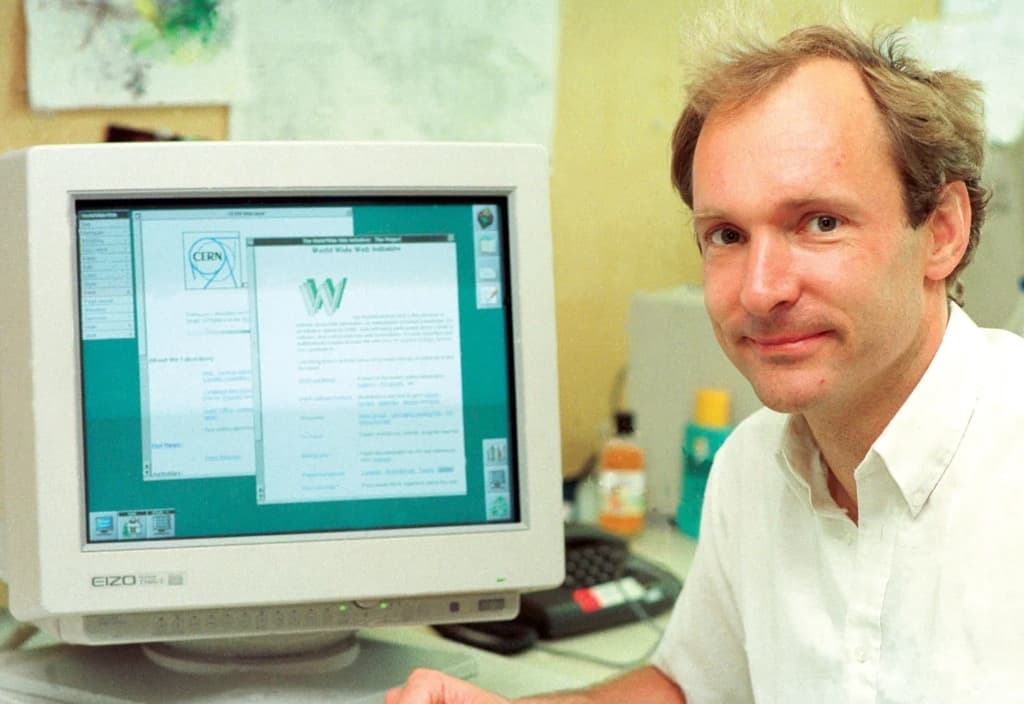
The internet is the global system that lets billions of computers, phones, and machines exchange data with one another — and because using it has become as habitual as flipping a light switch, almost nobody stops to ask what it physically is. It gets described as "the cloud," confused with the World Wide Web, and imagined as something that exists nowhere in particular.
Understanding it matters because nearly everything else in modern technology — cloud services, streaming, AI tools, online banking — assumes it exists and works. Misunderstanding it produces two opposite errors: treating it as an intangible, magical ether, or treating it as a single thing someone owns and controls. Neither is accurate. This explainer replaces both with a working mental model: what the internet is, how data actually moves across it, and where it breaks.
What Is the Internet, Exactly?
The internet sits inside computer networking as a specific, planet-scale implementation — not a single network, but a network of networks that agree to exchange traffic using the same rules.
The hierarchy: Information Technology → Computer Networking (connecting machines so they can exchange data) → Internetworking (connecting separate networks to each other) → The Internet (the single, public, global internetwork running on the TCP/IP protocol suite) → Services on top of it (the Web, email, streaming, video calls).
Plain-English definition: The internet is a worldwide web of cables, wireless links, and routers that lets any connected device send data to any other connected device.
More technical definition: The internet is a global, decentralized system of interconnected, independently operated networks that exchange data as packets using the Internet Protocol Suite (TCP/IP), with devices identified by IP addresses and traffic forwarded between networks by routers according to shared routing protocols.
Beginner version: The internet is a giant, worldwide postal system for computers: every device has an address, and messages are split into little envelopes that get passed along until they arrive.
What this definition does NOT imply: It does not imply that the internet is a single object, that one company or government owns or runs it, that it is wireless or "in the cloud," or that it is the same thing as the websites you visit. It is physical infrastructure plus a shared set of rules — nothing more mystical than that.
The Internet vs. the Web vs. the Cloud: What's the Difference?
These terms are used interchangeably in everyday speech, and that's where most confusion begins.
| Term | What it actually refers to |
|---|---|
| The Internet | The physical and logical network of networks that moves data between devices |
| The World Wide Web | One service running on the internet: pages, links, and media fetched with HTTP |
| A separate service on the internet, older than the Web and using different protocols | |
| The Cloud | Other people's physical servers in data centers, rented and reached over the internet |
| Intranet | A private network using internet technology, closed to the public |
| ISP | An internet service provider — one of the thousands of operators whose networks together form the internet |
The practical consequence: when "the internet is down," the problem could be your Wi-Fi, your ISP, a DNS failure, or one website's servers — four very different faults. Knowing which layer you mean is what makes troubleshooting, and conversations about the internet, make sense. If the internet is the highway system, the Web is the traffic and the destinations you visit along the way.
Why Does the Internet Exist?
The internet exists to solve one problem: letting computers built by different people, running on different networks, exchange information without having to be designed together.
Before internetworking, networks were islands — a university network couldn't talk to a military network or a company's network. The internet's founding design goal, developed from the ARPANET research project in the late 1960s and 1970s, was a system that could connect heterogeneous networks and keep working even if parts of it failed. Its function today is the same, at vastly larger scale: to be a general-purpose, shared transport layer that any application — from a text message to a video call — can use without building its own global network.
How Does the Internet Actually Work?
The central idea is packet switching over shared, open protocols. Instead of reserving a dedicated line for each conversation (as old telephone networks did), data is chopped into small, independent units called packets, each carrying its own destination address, and each forwarded hop by hop until it arrives.
The pipeline: Data (a message, a web request, a video frame) → Packets (small labeled chunks with source and destination addresses) → Routing (routers forward each packet toward its destination, network by network) → Delivery (packets arrive, possibly out of order and via different paths) → Reassembly (the receiving device puts them back together and checks nothing is missing) → Usable result (the page, message, or video you see).
Simple level: every device has an address, and the network passes little envelopes of data along until they reach the right address.
Intermediate level: before anything is sent, your device translates a name like a website domain into a numeric IP address using the Domain Name System (DNS). Your data is then split into packets. Each router along the way reads a packet's destination address, consults its routing table, and forwards it one hop closer. Packets from the same message may take different routes; they're reassembled at the destination.
Advanced level: the internet is layered. The physical/link layer moves raw signals over fiber, copper, or radio. The internet layer (IP) handles addressing and hop-by-hop forwarding — on a "best effort" basis, with no guarantee of delivery. The transport layer adds guarantees where needed: TCP numbers packets, acknowledges receipt, and retransmits lost ones; UDP skips those guarantees for speed (useful for live video and gaming). The application layer defines what the data means — HTTP for the Web, SMTP for email. Between independently run networks, the Border Gateway Protocol (BGP) lets each network announce which addresses it can reach, so the whole system can discover routes without any central map.
The building blocks, one level deeper:
- IP address: A numeric identifier for a device on the network — its mailing address. IPv4 addresses (like 192.0.2.1) are running out; IPv6 provides a vastly larger address space.
- Packet: A small unit of data plus a header containing addressing and control information. Breaking data into packets is what lets millions of conversations share the same links.
- Router: A specialized computer that forwards packets between networks based on their destination address — a digital sorting facility.
- DNS: The internet's directory service, translating human-readable names into IP addresses.
- TCP/IP: The protocol suite — the shared rulebook every participant follows, which is what makes independently built networks compatible.
- Physical links: Undersea and underground fiber-optic cables carry the vast majority of international traffic, with copper, cellular, Wi-Fi, and satellite links at the edges.
- ISPs and exchange points: Networks operated by different companies, which connect ("peer") with each other at internet exchange points to hand traffic across.
How the parts connect: Devices depend on ISPs for access; ISPs depend on each other to reach the rest of the world; routers depend on BGP announcements to know where to send traffic; every application depends on DNS to find anything at all. The system behaves as one network only because every part follows the same protocols — no single part is in charge.
A Real Request, Step by Step
What happens when you open a website on your phone:
- Name lookup: Your phone asks a DNS resolver for the site's IP address and gets back a number.
- Connection: Your phone opens a connection to that address (TCP, now usually encrypted with TLS).
- Request: Your browser sends an HTTP request for the page, broken into packets.
- Transit: The packets leave via Wi-Fi or a cell tower, cross your ISP's network, are handed to other networks at exchange points, and may cross an undersea cable.
- Response: The server sends the page back the same way, in packets.
- Reassembly: Your phone reassembles the packets, TCP re-requests any that were lost, and the browser renders the page — typically in well under a second.
The lesson: a single "click" is dozens of independent systems, owned by different organizations, cooperating through shared rules in real time.
What Can the Internet Do?
| Capability | Example | Limitation |
|---|---|---|
| Global reach | Messaging someone on another continent instantly | Access is still uneven across regions and incomes |
| Near-real-time transfer | Video calls, live streaming, online gaming | Distance adds latency; congestion causes lag |
| Resilience through redundancy | Traffic reroutes around a failed link | Concentrated chokepoints (a few cables, a few providers) still create single points of failure |
| Open innovation | New apps launch without anyone's permission | The same openness lets abuse and malware spread |
| Scale | Billions of devices sharing the same infrastructure | Original protocols weren't built for today's scale or security needs |
A Brief History of the Internet
- Packet switching (1960s): Researchers propose splitting data into packets to share links efficiently and survive failures.
- ARPANET (1969): A U.S. research network links a handful of universities — the internet's direct ancestor.
- TCP/IP (1970s–1983): A common protocol suite is designed so different networks can interconnect; ARPANET switches to it in 1983, often called the internet's birth.
- DNS (1980s): Human-readable names replace memorizing numeric addresses.
- The World Wide Web (1989–1991): Tim Berners-Lee builds the Web on top of the internet, making it usable for non-specialists.
- Commercialization (1990s): Commercial ISPs and browsers bring the internet to homes and businesses.
- Broadband, mobile, and cloud (2000s–today): Always-on connections, smartphones, and data centers make the internet the default platform for almost everything.
Each transition solved a real bottleneck: packet switching solved inefficient dedicated lines; TCP/IP solved incompatible networks; DNS solved unusable numeric addresses; the Web solved usability; commercialization solved access.
What the Internet Cannot Reliably Do
Separate fundamental limits (physics and design) from practical limits (current deployment):
- Fundamental — latency: Signals can't travel faster than light through fiber, so a round trip across the planet always takes tens of milliseconds or more.
- Fundamental — best-effort delivery: IP itself doesn't guarantee packets arrive; reliability has to be added on top (TCP), at a cost in speed.
- Design — security added later: The original protocols assumed a small network of trusted users. Encryption, authentication, and spam defenses were bolted on afterward, and gaps remain.
- Practical — congestion: When links are overloaded, packets are dropped or delayed, and quality degrades.
- Practical — uneven access: Billions of people still lack affordable, reliable connectivity.
Failure modes and edge cases: Normally, a lost link just means traffic reroutes. But a DNS provider outage can make healthy websites unreachable by name; a mistaken BGP announcement can misdirect traffic for large parts of the network; a cut undersea cable can slow an entire region; and governments can deliberately shut down connectivity. The normal model — "packets always find a way" — fails when the shared control systems themselves break.
Benefits, Risks, and Trade-Offs
For individuals, the internet changed how people communicate, learn, work, shop, and find community. For organizations, it enabled global markets, remote work, and cloud-based operations — much of what's described as digital transformation, and the platform dynamics explained by network effects. For society, it reshaped media, politics, education, and commerce.
It also carries real costs: cybercrime and fraud travel as easily as legitimate traffic; personal data is collected and tracked at massive scale; misinformation spreads quickly; and dependence on a few large platforms concentrates power.
| Trade-off | Why the tension exists |
|---|---|
| Openness vs. security | Anyone can connect and build, which also means anyone can attack |
| Decentralization vs. accountability | No central owner makes the network resilient but makes abuse hard to police |
| Speed vs. reliability | Guaranteeing delivery (TCP) costs latency; skipping it (UDP) risks loss |
| Convenience vs. privacy | Personalized, free services are often funded by tracking behavior |
| Global reach vs. local control | Borderless traffic collides with national laws and censorship |
When Is the Internet the Right Tool — and What Are the Alternatives?
The public internet is the right default when you need to reach many people or systems across organizations and locations cheaply. Alternatives exist where its trade-offs don't fit:
- Private networks and intranets: Same protocols, closed to the public — used for internal systems that shouldn't be exposed.
- Dedicated private lines: Leased connections between sites for predictable performance and isolation.
- Circuit-switched networks: The older telephone model, reserving a dedicated path per call — predictable but inefficient.
- Satellite and mesh networks: Extend connectivity where cables don't reach, with higher latency or lower capacity.
- Offline / physical transfer: For very large datasets, shipping drives can still beat the network.
The practical response to the internet's risks isn't avoiding it but layering defenses on top: encryption (HTTPS), strong authentication, software updates, backups, and skepticism toward unverified information. Much of what's called cloud infrastructure is built on exactly these layered protections.
The Complete Mental Model
The full loop: Device (with an IP address) → DNS (name becomes address) → Packets (data split into labeled chunks) → Access network (Wi-Fi, cellular, fiber to your ISP) → Interconnected networks (ISPs peering at exchange points, routes discovered via BGP) → Physical backbone (fiber and undersea cables) → Destination server → Response (the same path in reverse) → Reassembly (TCP restores order and fills gaps) → Application (the page, message, or stream you see).
In plain English: every connected device has an address; when it sends anything, the data is split into packets that are passed from router to router across thousands of independently owned networks, which cooperate only because they all follow the same protocols. The result feels instant and weightless, but it's physical infrastructure and shared agreement working together — which is why it's both remarkably resilient and vulnerable at its chokepoints.
The internet is a global, decentralized network of independently operated networks — physically built from cables, radio links, and routers — that moves data between devices as addressed packets using the shared TCP/IP protocols; it is the transport layer beneath the Web, email, streaming, and the cloud, not those services themselves, and its strengths (openness, resilience, scale) are inseparable from its weaknesses (security gaps, chokepoints, and uneven access).
Is the internet the same thing as the World Wide Web?
No. The internet is the underlying physical network of connected computers and cables. The World Wide Web is the system of pages, links, and media that runs on top of that infrastructure — if the internet is the highway system, the Web is the traffic and destinations on it.
What is an IP address?
An IP (Internet Protocol) address is a unique identifier assigned to every device connected to the internet — a smartphone, laptop, or smart TV. It functions as that device's digital mailing address, letting data find its way to and from it.
How does data actually travel across the internet?
Data is broken into small units called packets. Packets travel through routers — specialized computers that act like digital sorting facilities — which guide each packet along the fastest available path to its destination, where it's reassembled into the page, message, or video you see.
Is the internet a physical thing, or something abstract like the cloud?
It's physical. The internet is a massive infrastructure of underground cables, fiber optics, satellites, and wireless connections — not a single object or a metaphorical cloud floating somewhere. The cloud itself is just someone else's physical servers, reachable over this same infrastructure.
Part of the What Is? explainer series at The Best Blog Ever.